

Apple’s WWDC 2026 keynote aired on Monday, June 8, 2026, at 10:00 AM PT. That is around 1:00 AM on June 9 in Southeast Asia, including the Philippines. This was a historic event as it marked the final developer keynote led by outgoing CEO Tim Cook. The main focus was the official launch of the new Siri AI, next-generation Apple Intelligence features, and the preview of the “Class of 27” operating systems such as iOS 27 and macOS 27 “Golden Gate”.

The presentation began live at Apple Park in Cupertino, California which can be watch on their official Youtube channel. The full developer conference runs through June 12, which serves as Tim Cook’s formal farewell. John Ternus, currently head of hardware engineering and Cook’s successor, did not appear in the video but is expected to officially take over as CEO later this year. Many tech influencers attended, including Mary Bautista, one of the most popular Filipino tech reviewers, along with many others.
Developer betas became available immediately after the keynote. Public betas will arrive in July, and the full consumer release is scheduled for Fall 2026 alongside new hardware. It is important to note that due to ongoing regulatory issues related to the Digital Markets Act, full Siri AI and Apple Intelligence features will be delayed or restricted for users in the European Union and China at launch. In fact, because of strict regulations and antitrust concerns, these core AI features will be completely unavailable in those regions when the update first rolls out.
Now, let’s break down the WWDC 2026 event and explore everything new.
The New Siri AI & Apple Intelligence Era
The new Siri AI is a complete overhaul and reimagining of the old assistant, now deeply integrated with custom-built artificial intelligence. Earlier this year, Apple and Google announced a major collaboration that combines Google Gemini technology with Apple’s own internal foundation models. The updated Siri features full awareness of what is on your screen, advanced contextual understanding, and the ability to execute natural language commands across iOS, macOS, and visionOS.

One major highlight is the System-Wide Writing Tools feature. Users can draft text, receive feedback on tone, and get automatic proofreading for drafts inside Mail, Notes, and even third-party applications.
Here is the complete list of features:
- AI-Infused Safari: It includes a new “Notify Me” tool that works as an all-in-one webpage and price tracker. Safari also uses AI to automatically group dozens of open tabs by subject and update or replace weak or compromised passwords on your behalf.
- Intelligent Photo Editing: This section features upgraded Clean Up tools, spatial reframing that converts regular photos into 3D spatial images, and generative editing shortcuts.
- Dedicated Siri App: It adds a central workspace where you can review, save, or return to past text and voice conversations. Siri AI chats sync automatically and privately via iCloud across iPhone, iPad, and Mac. You can swipe down from the Dynamic Island to open a quiet text field for typing to Siri. Built-in sliders let you adjust the assistant’s reading speed and emotional tone.
- True On-Screen Awareness: Siri reads text, files, or images currently displayed on your screen. For example, it can pull an address from a message and instantly map it without closing the app. It also handles multi-step commands across different apps, searches your history for items like receipts or flight details, and uses Google Gemini to answer complex questions that require real-time external data.
- Camera Siri Mode: This connects directly to the iPhone Camera interface. You simply press the shutter button, and Siri captures and analyzes whatever is in front of you.
- Live Action Shortcuts: Using Siri Mode, you can automatically split dining bills via Apple Cash or instantly calculate nutritional facts from a photo of your food.
- Cross-Platform Visual Search: Visual Intelligence is no longer limited to iPhone. Mac users can press a keyboard shortcut to crop their screen for analysis, while iPad users can query Siri AI directly from the screenshot view.
iOS 27 and iPadOS 27 System Upgrades
Core performance improvements focus heavily on speed and stability. Apps now load up to 30% faster, and AirDrop transfer speeds have increased by up to 80%. Apple also redesigned the CPU scheduler. This means older devices that support iOS 27, including the iPhone 11 series, run noticeably faster and have better battery efficiency. The search system was rebuilt as well, allowing Spotlight, Mail, and Photos to index new files almost immediately.

System Performance Speed Improvements
- Apps launch 30% faster, photos load 70% quicker, and AirDrop transfers are up to 80% faster. External drives connected to iPad now perform at the exact same speeds as they do on Mac. The new CPU scheduler makes multitasking smoother, and support extends all the way back to the iPhone 11 series.
Liquid Glass 2
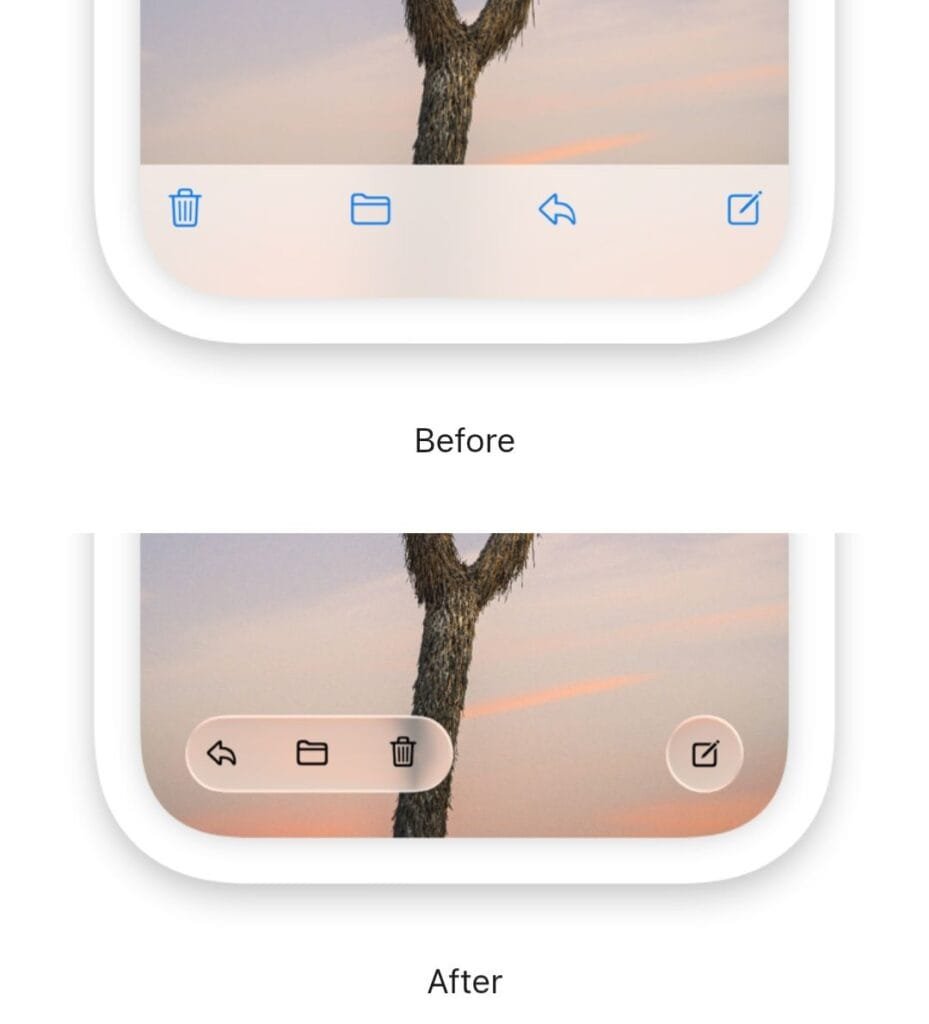
- Readability Transparency Slider: Apple added a control in Settings to adjust transparency levels. This directly fixes the readability problems caused by the previous glass-heavy design language.
- Dimensional App Icons: Home screen icons now feature a fresh, layered, three-dimensional appearance.
- Unified Toolbars: Native apps across iOS and iPadOS now share identical, standardized top toolbars for a cleaner and more consistent look and feel.
Photos App & Camera AI Editing Tools
- Spatial Reframe: Using on-device spatial models, you can change the angle or perspective of any photo after capture. The system dynamically generates missing pixels to fill gaps. The Extend tool uses generative AI to expand image borders and naturally fill in background details. The Clean Up feature is also upgraded, using AI to remove unwanted objects and fill the space with realistic details.
Watch this sample of spatial reframing by Ben Geskin on X:
System Keyboard, Safari, & Passwords
This update brings smarter tools for typing, automation, browsing, and security. Dictation automatically cleans up and formats your speech. Shortcuts lets you build automations just by describing what you want. Safari organizes tabs and alerts you to changes, while passwords are updated and secured automatically.
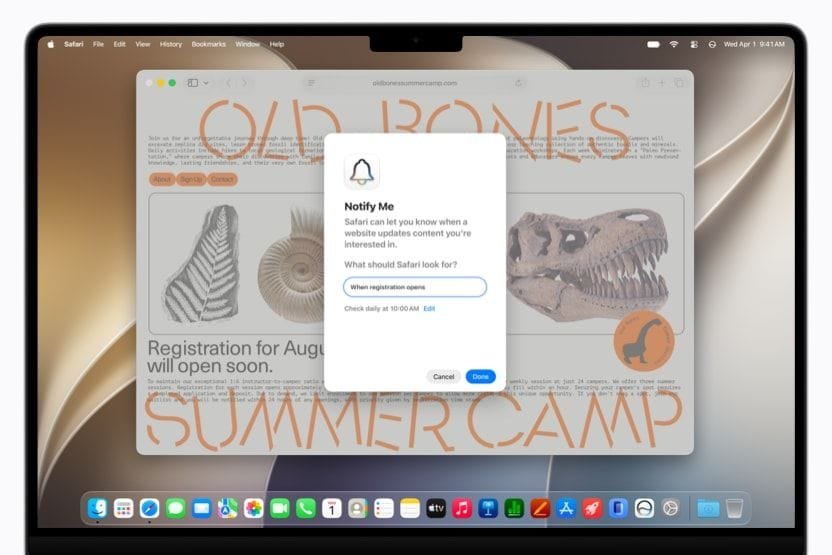
- Contextual Dictation: New dictation transcribes speech while removing filler words and automatically fixing punctuation and capitalization.
- Shortcuts Natural Language Build: You can create automations in Shortcuts simply by typing what you want to achieve.
- AI Safari Tabs: Automatically groups open tabs by topic.
- Safari Monitor Alert: Adds an option to track price drops or restocks on specific web pages.
- Auto-Password Interceptor: The Passwords app gains permission to log in and replace weak or compromised passwords automatically.
Health, Safety & Parental Controls
This update introduces meaningful new tools for health tracking, content safety, and family management. The Health app now offers dedicated tracking for reproductive health. Enhanced safety features automatically block harmful content. For younger users, strict safeguards are now mandatory.

- Menopause Support: Health app now tracks perimenopause, menopause, and related cycles in detail.
- Redesigned Screen Time: Gives parents a clear dashboard showing which apps kids use most. It also offers expert-recommended restrictions based on age.
- Mandatory Child Accounts: Required for users under 13 with strong system safeguards. Kids use “Ask To Browse” to send access requests directly to a parent’s device.
- Communication Safety: Automatically blurs explicit or violent images and videos in real time. It sends alerts to parents if a minor receives this type of content.
macOS 27 “Golden Gate” & watchOS 27
macOS 27 brings major upgrades to intelligence, design, and performance, while marking a clear transition to Apple Silicon only. Siri AI becomes a dedicated desktop app with full sync. You can start queries in Spotlight or control files from the right-click menu. Visually, you get the transparency slider and cleaner layouts. Search is instant, and ultrawide displays work better than ever. Most importantly, this version ends support for Intel processors and runs exclusively on M-series chips.
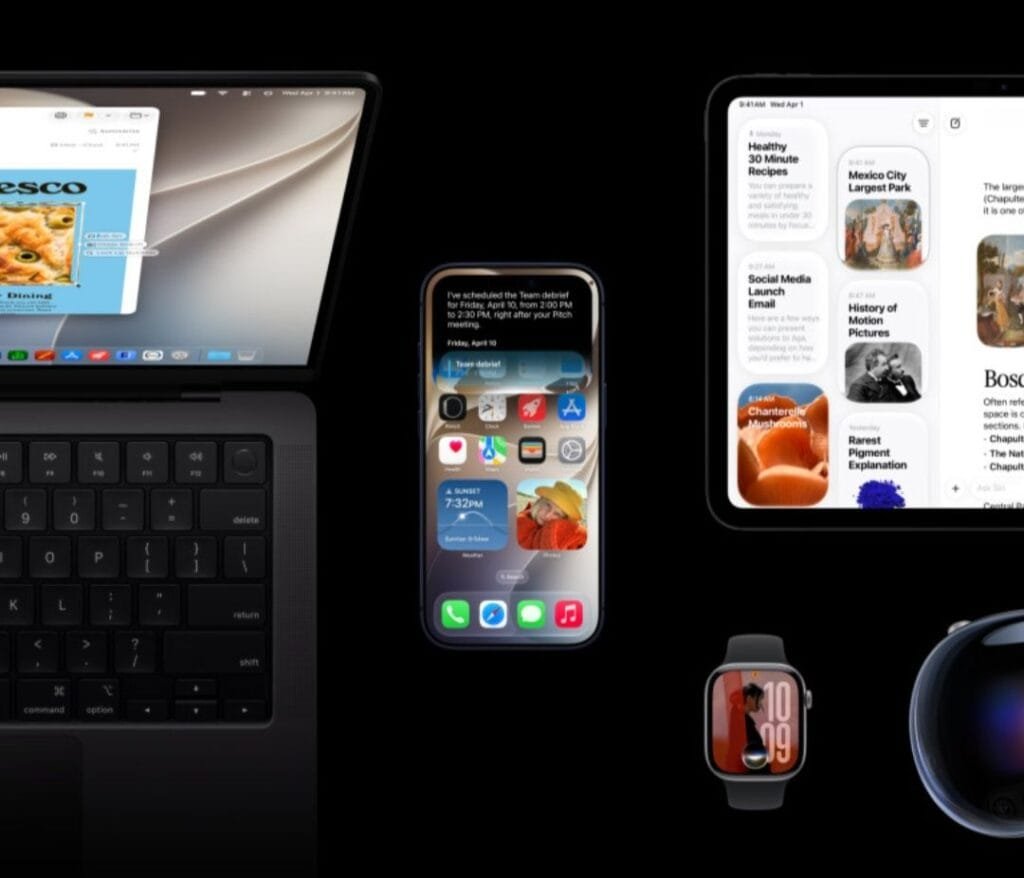
macOS 27 “Golden Gate” Key Features
- Siri AI Standalone Desktop App: Turns the legacy assistant into a proper desktop chat window. Conversations sync fully via iCloud, so you can start on iPhone or iPad and continue on Mac.
- Spotlight Hand-Off Queries: Type complex questions directly into Spotlight. The system automatically understands the query and opens it in a Siri AI conversation.
- Context-Aware File Commands: Adds a Siri prompt box to the standard right-click menu. You can ask questions about the content of any selected file.
- Liquid Glass Opacity Slider: Fixes legibility complaints from the previous version by adding a global control in Settings. You can adjust the design from fully transparent to deeply tinted.
- Unified Layout Toolbars: Standardizes the top bars across all apps, reduces window corner roundness for a tighter look, and extends sidebars to the edge of the window for clearer multitasking.
- Rebuilt System Search Indexing: Completely rewritten background systems for Spotlight, Mail, and Photos. New files and images become searchable instantly.
- Ultrawide Display Enhancements: Adds native support optimized for high-resolution ultrawide screens. It maintains perfect layouts up to 5K resolution at 120Hz.
- The Intel Cutoff: This update officially ends support for all Intel-based Macs. macOS 27 runs only on Apple Silicon (M-series) models.
watchOS 27 Key Features
watchOS 27 changes how you interact with Apple Watch. It brings a full on-device Siri AI app matching iPhone and Mac. The interface gets a fresh, customizable grid and faster access to widgets. Workout tracking is more detailed and now supports Spanish. Cycle tracking offers deeper health data. Notably, compatibility is strictly limited to newer hardware.
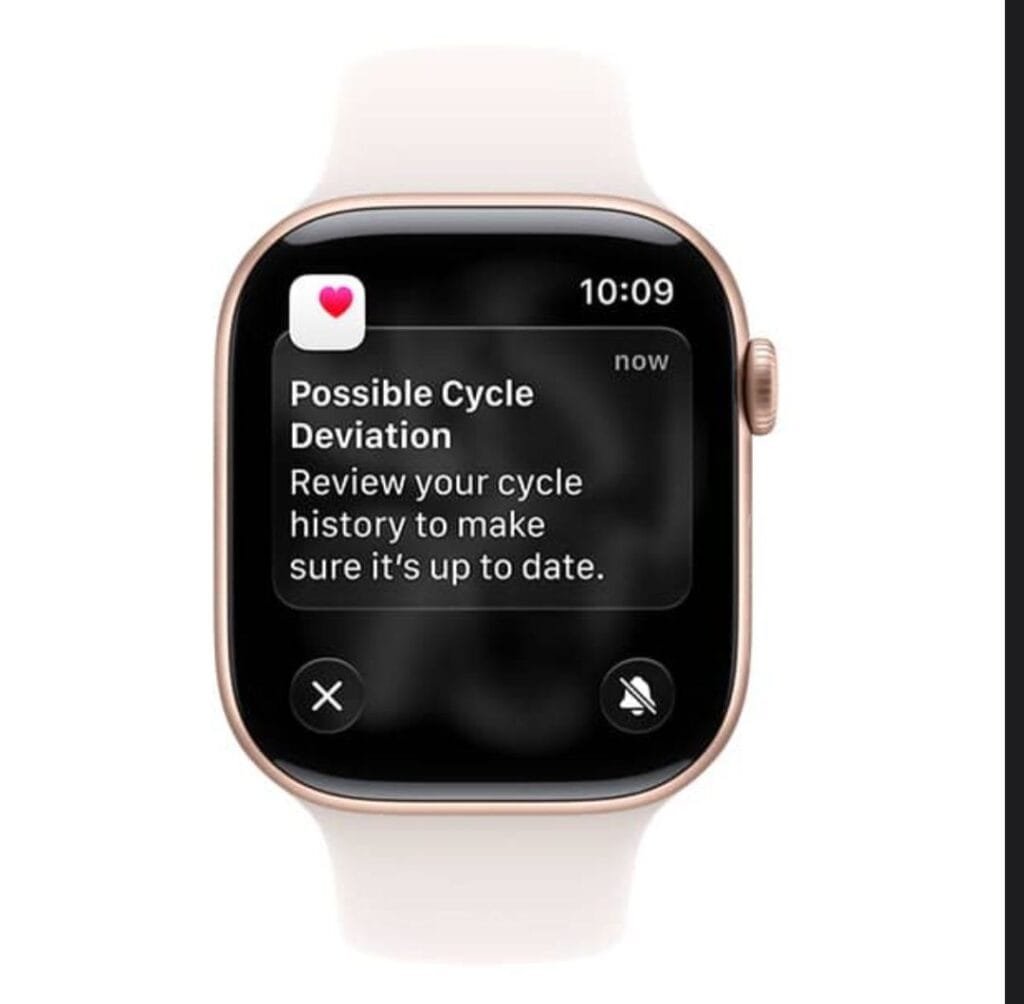
- Dedicated Siri AI Smart App: Brings full on-device Siri AI to Apple Watch, matching the features found on iOS and Mac.
- Dynamic App Grid Presentation: Modernizes the interface with a fully customizable and dynamic layout.
- Single-Tap Widget Stack: One tap instantly opens your Smart Stack for faster navigation.
- Workout Buddy Analytics: Improves real-time tracking with advanced insights, better heart rate monitoring, and full Spanish language support.
- Enhanced Cycle Tracking: Works with updated HealthKit to deliver much more detailed logging for menstrual and reproductive health.
- Strict Compatibility Limits: Unlike iOS 27, this version drops support for many older watches. It only runs on Series 9, 10, 11, Ultra 2, Ultra 3, and SE (3rd Gen). Any model older than the S9 chip is excluded.
List of iPhone Compatibility: iOS 27 Support
Here is the complete list of 29 iPhone models that work with iOS 27. The rumored Apple iPhone Ultra is also reportedly set to launch with iOS 27.
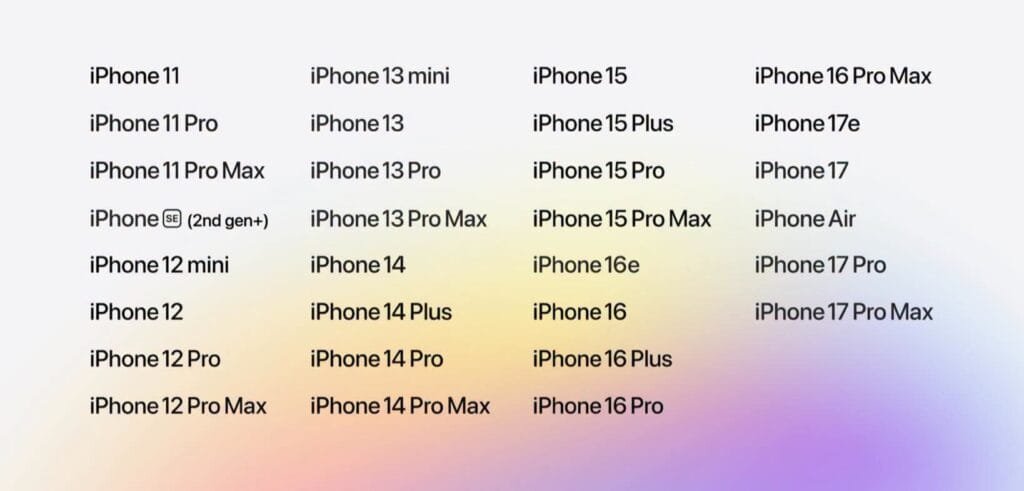
iOS 27 Compatible iPhone Models
| Series | Compatible Models |
|---|---|
| iPhone 17 & 16 Series | • iPhone 17 Pro Max • iPhone 17 Pro • iPhone 17 • iPhone 17e • iPhone Air • iPhone 16 Pro Max • iPhone 16 Pro • iPhone 16 Plus • iPhone 16i • iPhone 16e |
| iPhone 15 & 14 Series | • iPhone 15 Pro Max • iPhone 15 Pro • iPhone 15 Plus • iPhone 15 • iPhone 14 Pro Max • iPhone 14 Pro • iPhone 14 Plus • iPhone 14 |
| iPhone 13, 12 & 11 Series | • iPhone 13 Pro Max • iPhone 13 Pro • iPhone 13 • iPhone 13 mini • iPhone 12 Pro Max • iPhone 12 Pro • iPhone 12 • iPhone 12 mini • iPhone 11 Pro Max • iPhone 11 Pro • iPhone 11 |
| iPhone SE Series | • iPhone SE (3rd generation) • iPhone SE (2nd generation) |
List of Apple Devices Supported by Apple Intelligence
Apple Intelligence is Apple’s built‑in smart features working across iPhone, iPad, Mac, Apple Watch, and Apple Vision. Mary Bautista joined WWDC 2026 and has shared the full list of supported devices on her Facebook page. These features run directly on your device for privacy and work with the latest operating system versions released at the event. Below are the devices that support Apple Intelligence.
Apple Intelligence & Siri AI Supported Devices
Available in iOS 27, iPadOS 27, macOS 27, watchOS 27, and visionOS 27
| Device Category | Supported Models |
|---|---|
| iPhone |
|
| iPad |
|
| Mac |
|
| Apple Vision |
|
| Apple Watch |
|
Restricted in other Regions
iOS 27 installs easily on older models like the iPhone 11, but advanced Siri AI and Apple Intelligence features are limited by hardware requirements. You need a minimum of 8GB of RAM. This means you must have iPhone 15 Pro or newer, iPhone 16 or newer, or iPhone Air to access the upgraded assistant. The most powerful on-device AI models require 12GB of RAM. These exclusive features are only available on iPhone 17 Pro, iPhone 17 Pro Max, and iPhone Air. Older models from iPhone 11 up to the standard iPhone 15 will still receive all speed, search, and parental control updates, but they will not get the new Siri AI features.
Discover more from wazzuptechph
Subscribe to get the latest posts sent to your email.
